GoogleNowWallpaper HD1.5.1
Publisher Description
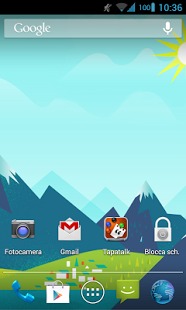
Get the Google Now style on your homescreen!
This application changes your current wallpaper with a google now wallpaper based on your clock time.
The wallpaper will be changed automatically in a certain time (configurable by user), selecting the right wallpaper.
NOTICE: this isn't a live wallpaper! so it doesn't drain your battery :)
if wallpaper isn't changing with the last update, please re-apply the wallpaper!
----if you're having issues, please download old version http://goo.gl/2Sln9 ----
Features:
* 11 wallpaper included in 4 versions (dawn,day,dusk,night) extracted from google now
* wallpaper resolution: 2560x1098 (I can't do better because original wallpaper are relatively small)
* configurable time period
* google now card UI included
* runs at device startup
* no battery drain!!
Permissions:
SET_WALLPAPER: apply wallpaper
RECEIVE_BOOT_COMPLETED: starts at boot
WRITE_EXTERNAL_STORAGE: to write wallpapers to external memory (in folder /sdcard/gnowwp )
BILLING: to make donations. Don't worry, there's no paid content! :) it's only useful to support the developer
About GoogleNowWallpaper HD
The company that develops GoogleNowWallpaper HD is Bongoman Dev. The latest version released by its developer is 1.5.1. This app was rated by 1 users of our site and has an average rating of 3.0.
To install GoogleNowWallpaper HD on your Android device, just click the green Continue To App button above to start the installation process. The app is listed on our website since 2013-12-16 and was downloaded 11 times. We have already checked if the download link is safe, however for your own protection we recommend that you scan the downloaded app with your antivirus. Your antivirus may detect the GoogleNowWallpaper HD as malware as malware if the download link to com.bongoman.gnowwallpaperhd is broken.
How to install GoogleNowWallpaper HD on your Android device:
- Click on the Continue To App button on our website. This will redirect you to Google Play.
- Once the GoogleNowWallpaper HD is shown in the Google Play listing of your Android device, you can start its download and installation. Tap on the Install button located below the search bar and to the right of the app icon.
- A pop-up window with the permissions required by GoogleNowWallpaper HD will be shown. Click on Accept to continue the process.
- GoogleNowWallpaper HD will be downloaded onto your device, displaying a progress. Once the download completes, the installation will start and you'll get a notification after the installation is finished.
Program Details
System requirements
Download information
Pricing
Version History
version 1.5.1
posted on 2013-12-16
version 1.0.9
posted on 2013-05-30
Several fixes and updates
